

For fire departments
Enrol your fire department
Fire, smoke and panic alarms from monitored vehicles and buildings in your area arrive on your station console, with the live position, the owner, their contacts and their pre-incident plan.
Joining a department that's already enrolled? Open the invite link your admin sent you.
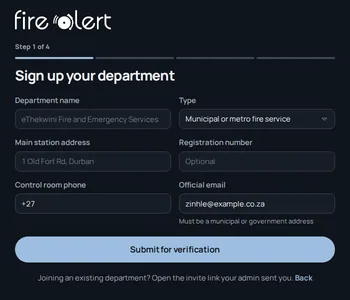
How enrolment works
From sign-up to your first alarm
Four steps in the station console. You can look around while we verify your department.
- 1
Sign up your department
Your department name and type, the main station address, the control room phone and an official email.
- 2
We verify it
We check every department with the municipality and call your contact before it can receive alarms.
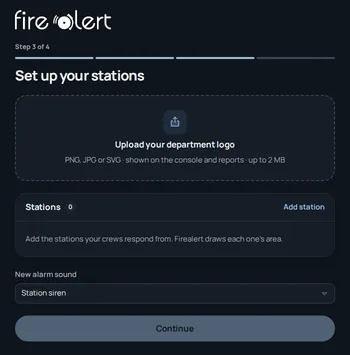
- 3
Set up your stations
Add the stations your crews respond from and Firealert draws each one’s area. Add your logo and pick the alarm sound.
- 4
Invite your team
Dispatchers, officers and crews each get their own sign-in. Then alarms from your area start arriving.
Before you start
What you'll need
- Your department’s name and type, for example a municipal or metro fire service
- The main station’s address and the control room phone number
- An official municipal or government email address for the person enrolling
- Your department’s registration number, if you have one (optional)
- The stations your crews respond from
Once you're enrolled
What your station gets
The console is built for the control room and the station: dark, loud when it needs to be, and quiet when it doesn't.
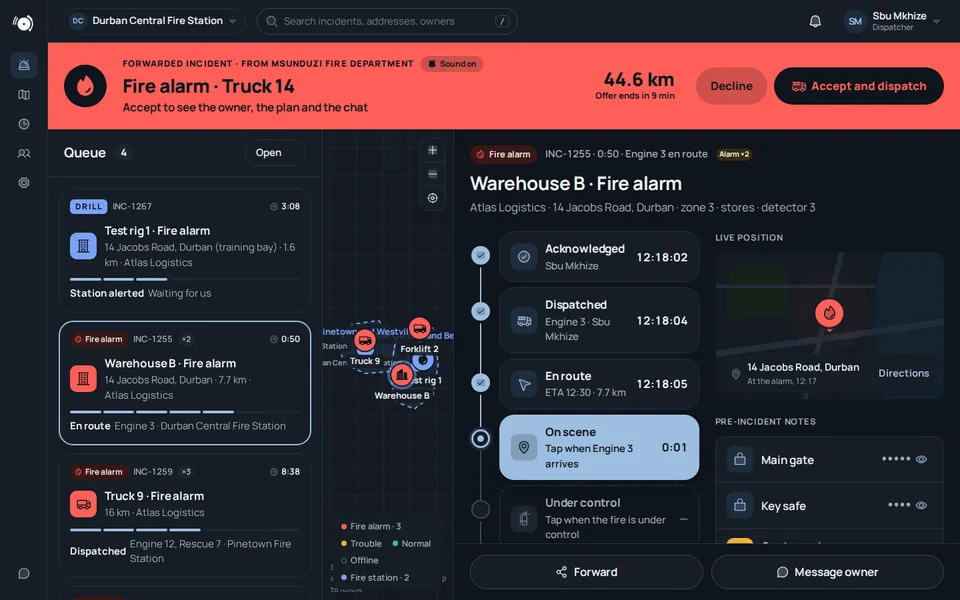
Alarms with the facts
The asset, the owner, the distance and the live position, the moment an alarm reaches your station.
Know before you arrive
The owner's pre-incident notes, access details and contacts, and a chat with the owner.
Forward when you can’t go
Pass an alarm to a neighbouring station with a reason and a note.
History and analytics
Every callout with its outcome and timings, and your station’s alarms over time.
Ready to enrol?
It takes a few minutes to sign up. Questions first? Call or WhatsApp us on +234 815 170 0676.