

For installers and resellers
Fit Firealert for your customers
Firealert partners fit and look after monitored fire alarms in trucks, buses, machinery and buildings. You set the customer up, fit the device, test every zone from your phone and hand over a signed installation certificate.
Already a partner? Sign in to the partner portal
Who it’s for
Built for the people who fit it
Companies that fit, sell or look after fire protection and vehicle equipment, and want their customers to know the moment an alarm goes off.
Fire-system installers
Add monitoring to the detection and suppression you already fit. Each alarm reaches the owner’s team, and you keep a dated record of how every installation was tested.
Vehicle fitment centres
Fit the controller and sensors in the bay, test every zone before the vehicle leaves, and hand the fleet owner a signed certificate.
Resellers
Sell Firealert to your customers, hold device stock from Firealert and pass it on to the installers who work under you.
What partners get
Everything from stock to sign-off
The partner portal on the web for your office, and installer mode in the Firealert app for the people in the field.
Customer onboarding
Set up a new customer’s organisation. We email the owner an invitation to take it over, and you keep access to work on it.
Device stock from Firealert
Firealert allocates devices to verified partners. See what you hold and what you’ve installed, pass devices on to your sub-installers, or give one back.
Installer mode on the phone
Your customers and the devices to install, with live diagnostics: readings, the device clock and every packet as it arrives. Push the settings and see the device confirm them.
Zone checks
Put the zones in test mode and trigger each one. A zone passes when the device reports it, and nobody is alerted while you test. A zone that doesn’t answer gets what to check and a retry.
Signed installation certificates
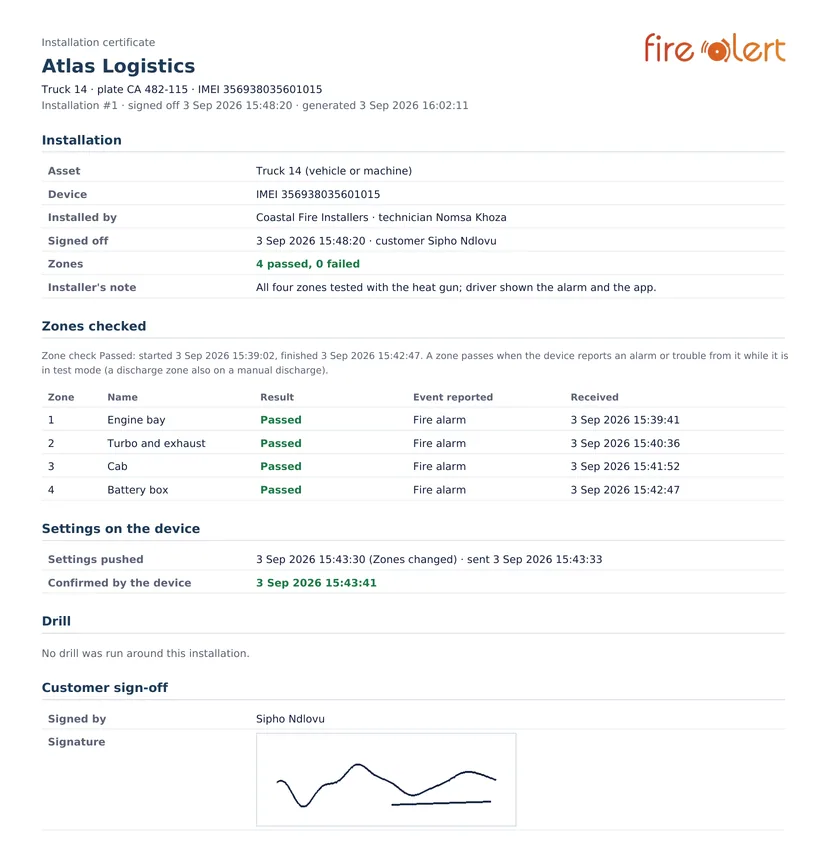
The customer signs on your phone, next to your photos. The PDF lists the device, the technician, every zone and its result, with a SHA-256 fingerprint of its data.
Your team and technicians
Admins run everything; technicians see only the customers you assign them. Invite people by email or with a link.
Self-tests and drills
Self-test compliance for each customer, most overdue first, and a log of the drills run on their vehicles and buildings.
A partner code for your customers
Every partner has its own code. Customers already on Firealert add you with it in Settings › Partners, and can remove you there too.
Your customers stay in control. You see their device health and how many incidents they’ve had. You see the full incident history only if they approve, and they can take that back. What you do on their account is logged for them.
How it works
Four steps to your first installation
We verify every partner before it can hold stock or reach customers, so owners know who is working on their alarms.
Joining a partner that is already on Firealert? You don’t sign up again: ask its admin for an invitation.
- 1
Create an account
Sign up on the Firealert web app and confirm your email. If you already use Firealert, sign in instead.
- 2
Add your partner details
Your company’s name, whether you install, resell or both, the company email and phone and your country. A registration number and address help us verify you.
- 3
Firealert verifies your company
We check your registration and call a number we found ourselves, not only the one you gave us. We email you when you’re verified, or tell you what to fix.
- 4
Start installing
Invite your technicians, take stock from Firealert, onboard your customers and sign off your first installation from the phone.
Questions from installers and resellers
Do my customers need to be on Firealert already?
What can I see on a customer’s account?
Which phones does installer mode run on?
What if a zone doesn’t respond during the check?
Can I install under a reseller?
Become a Firealert partner
Signing your company up takes a few minutes. We’ll verify it and let you know by email.
Sign up as a partnerAlready a partner? Sign in to the partner portal
Prefer to talk first?
We’ll take you through the partner portal, installer mode and stock.
WhatsApp+234 815 170 0676Call+234 815 170 0676Emailhello@firemobile.dev